In Spring Security, the SecurityContext is a central place that holds the security information of the current execution thread — typically, the currently authenticated user. SecurityContext is used in:
- Filters (e.g.,
UsernamePasswordAuthenticationFilter,JwtAuthenticationFilter) - Controllers (to get current user)
- Authentication providers (for authorisation decisions)
- Auditing/Logging (who did what?)
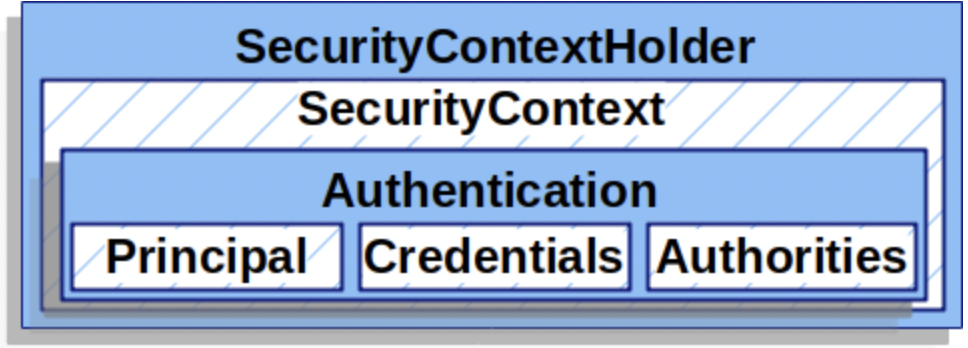
The SecurityContext contains an Authentication object. The SecurityContext is managed by and can be obtained from the SecurityContextHolder.
Security context holder
Whenever a component in Spring Security (such as a filter, authentication provider, controller, or service) needs access to the currently authenticated user, it retrieves the Authentication object from the SecurityContext, which is held by the SecurityContextHolder.
How does it work in practice
Authentication
Authentication happens early in the filter chain — e.g., via a UsernamePasswordAuthenticationFilter, or JwtAuthenticationFilter.
Once authenticated, Spring calls:
SecurityContextHolder.getContext().setAuthentication(authentication);This stores the Authentication in the thread-local security context.
Access SecurityContext
Any other component can now access the current user like this:
Authentication authentication = SecurityContextHolder.getContext().getAuthentication();Authentication and the authentication object
The Authentication is an interface that serves two main purposes within Spring Security:
- Credentials and details used for authentication (unauthenticated authentication).
- The authenticated user and their identity (authenticated authentication).
The authentication contains three components:
| Component | Description | Example |
|---|---|---|
| Principal | The identity of the user. Often a UserDetails object, a username (String), or a JWT. | "Jone_Doe" or a UserDetails object or a Jwt object |
| Credentials | The secret used to verify the principal’s identity. Typically a password or token. | "password123" or "eyJhbGciOiJIUz..." |
| Authorities | A collection of permissions or roles granted to the user. | [ROLE_USER, ROLE_ADMIN] |
Below is the code for the Authentication interface. |
public interface Authentication extends Principal, Serializable {
    Collection<? extends GrantedAuthority> getAuthorities();

    Object getCredentials();

	// Additional information about the request (e.g., IP address, session ID). Optional.
    Object getDetails();

    Object getPrincipal();

	// Indicates whether the user has been successfully authenticated.
    boolean isAuthenticated();

    void setAuthenticated(boolean isAuthenticated) throws IllegalArgumentException;
}
You always work with a concrete class that implements an interface. In Spring Security, there are some common implementations of the Authentication interface.
| Class | Description |
|---|---|
UsernamePasswordAuthenticationToken | Used for username/password logins. Before and after authentication. |
JwtAuthenticationToken | Used when authentication is based on a JWT. |
AnonymousAuthenticationToken | Used to represent an anonymous (unauthenticated) user. |
OAuth2AuthenticationToken | Used with OAuth2 login flows. |
PreAuthenticatedAuthenticationToken | Used when a system already trusts the user (e.g., SSO). |
Before authentication (input to AuthenticationManager)
Known as the unauthenticated authentication.
When a user submits login credentials (e.g., username and password), Spring creates an unauthenticated Authentication object — typically something like UsernamePasswordAuthenticationToken.
Authentication unauthenticated = new UsernamePasswordAuthenticationToken("user", "password");At this point:
- The
isAuthenticated()isfalse - Only credentials are available and set (e.g., username/password)
- It is used as an input to an AuthenticationManager.
Then, Spring calls the authenticate method of the AuthenticationManager:
Authentication result = authenticationManager.authenticate(unauthenticated);After authentication (represents the authenticated user)
Known as the authenticated authentication.
If authentication is successful, the AuthenticationManager returns a fully populated and authenticated Authentication object.
At this point, the authentication object:
- The
isAuthenticated()istrue - The principal is set
- Granted authorities/roles are set
Spring then stores this result in the SecurityContext:
SecurityContextHolder.getContext().setAuthentication(result);From this point forward, you can retrieve the authenticated user’s information from:
Authentication auth = SecurityContextHolder.getContext().getAuthentication();Back to parent page: Spring and Spring Boot
Spring Spring_Security SecurityContext Authorisaton
Reference: